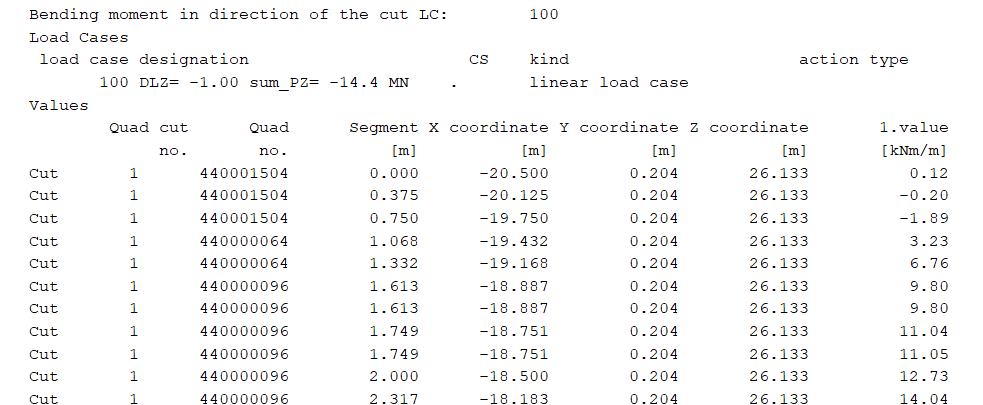
Exporting Cut Results from QUAD Elements:
Is it possible in Teddy to export results to Excel from cuts in QUAD elements? I have already created the cuts in Wingraf, but I would like to export the results directly to Excel. I’ve successfully done this for beam elements using Resultsviewer, but I can’t find the cut results for QUAD elements in the database.
Copying Cut Results from Wingraf to Excel:
In Wingraf, cut results can be displayed as text (see figure below). How can I copy these results into Excel? Is there a way to save the text results from Wingraf as a text file that can be imported into Excel?
Hello,
If you select to display as list with
QUAD TYPE MX REPR DLCT
after your cut definition, you should be able to get them in text form in the .lst file at the end of the WING module.
Here is an example attached.
cut-values.dat (925 Bytes)
Does that help?
Thank you for a good example. This solves my problem.
Is it possible to set up the above ‘cut-values’ script so that the values are exported directly to Excel, similar to the XLSX output in ‘Results’? Based on the above, I can manually copy the cut-values from the results file into Excel, but since I am adjusting my model, it would be helpful if the values could be exported to Excel automatically as well.
Hi,
Since the values are not in the database, it’s not possible to export them with the Excel interface. I don’t know about the module RESULTS. I guess it’s not possible since the cut and the values are not in the database.
I think you can make a .csv file and then link to it from Excel. Would this be a tolerable workaround?
I just tried the following commands with PowerShell, you could put them into a script as you like and execute it after your calculation.
> Get-Content .\cut-values.lst | Select-Object -Last 29 > cut-values.csv # retrieve the last 29 lines of the file and write them to csv

> (Get-Content -Path .\cut-values.csv) | ForEach-Object {$_ -Replace " * ",";"} | Set-Content -Path .\cut-values.csv # replace the spaces with semicolons

> (Get-Content -Path .\cut-values.csv) | ForEach-Object {$_ -Replace "\.",","} | Set-Content -Path .\cut-values.csv # replace the dots with colons, so that Excel recognizes them as numbers (German locale)

> & 'C:\Program Files\Microsoft Office\root\Office16\EXCEL.EXE' .\cut-values.csv # open in Excel