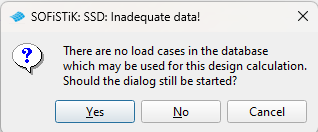
I have defined all my loadcases with MAXIMA in teddy, and i can see them in wingraf. they are not type (D) though, as i have my own defined actions.
So how can i use my MAXIMA defined combinations for design of area elements?
I would just calculate your maxima as “D” so you will be able to acces them via SSD, then export “design ULS” module to Teddy, so you will have the code to adjust for your need. Then go back to your own combination’s.
Via teddy you won’t have that problem, maybe there will be an warning, for wrong definition of maxima, but you can just off that with “CTRL WARN…” input in Teddy .
Also you can write your own code, so I’ll recomend for you examples in Teddy.
Hello,
with the description it is difficult to give a solution. It would be better to have the input here.
In MAXIMA, action combinations are defined with their superpositions. The prerequisite is that corresponding initial load cases with their results (internal forces, displacements aso.) are available.
With kind regards
Sabine Fahrendholz
Senior Product Manager
That is what I was thinking to do, but it seems weird that you can’t just automatically use your own combinations. I don’t know if I am missing some logic here? as to why it is not possible?
Sorry, unfortunately, I don’t know what the answer means. It is easier to talk about a specific example. Please send a (small) data file with your questions.
With kind regards
Sabine Fahrendholz
Senior Product Manager
I dont think it makes sense in this case to send an example.
My question is simply why i can’t use maxima combinations that are not classified as action (D) when using the module for designing area elements.
As RozB suggested, the work around seems to be to define a combination as (D) so you can convert the task to teddy, and only then you can start using MAXIMA combinations that are defined as something else as (D).
There is probably a very good reason why this is setup this way, but i can’t seem to find it.
thank you for the answer.
Now I have understood the question, which is not directly a topic of MAXIMA.
The topic here is how SOFiSTiK divided ‘load cases’.
Load cases in SOFiSTiK are these with ‘real loads’ as well as calculated load cases e.g. with forces from modal analyses, eigenvalues and also the results of superpositions.
All information about these load cases is saved in one record of the database. Identifiers are used to distinguish between the different load case variants.
For the design with BEMESS and AQB the superimposed load cases have to be marked as design load cases. The EN provides for several design cases:
- ultimate limit state
fundamental, accidental, earthquake design which use the results from different ULS action combinations
- serviceability
checks for crack width, deformations which use the results from different SLS action combinations
In order to use the correct superpositions values for the specific design task the corresponding identifiers are necessary to define in MAXIMA record COMB item TYPE and call it e.g. in BEMESS record LC, e.g. (D) for ULS fundamental design. This is the only way to take into account the corresponding material safety factors, which differ in the various design tasks.
Furthermore, for some workflows with MAXIMA it can be necessary not to assign the superposition results to a design task. The is the case of pre-superpositions and later final superpositions e.g. for bridges. Here the results of the pre-superpositions get the information: not use for design checks.
With kind regards
Sabine Fahrendholz
Senior Product Manager