EN:
Hello everyone,
we have identified an issue in Revit 2024 affecting the SOFiSTiK Reinforcement and BIMTOOLS applications after a recent Autodesk update build 24.3.50.51.
Our applications rely on an internal DLL named sof_sip, which depends on an additional component typically delivered with Revit. Following the latest update, this dependency has undergone internal changes while remaining present in the system.
As a result:
-
The required DLL is still detected as available,
-
Our installation and loading logic assumes a compatible environment,
-
Our own validated version of the dependency is not deployed or activated,
-
This leads to unexpected behavior or malfunction in our applications.
Impact:
-
SOFiSTiK Reinforcement may not load or may behave unexpectedly
-
BIMTOOLS can be affected in a similar way
-
Example message:
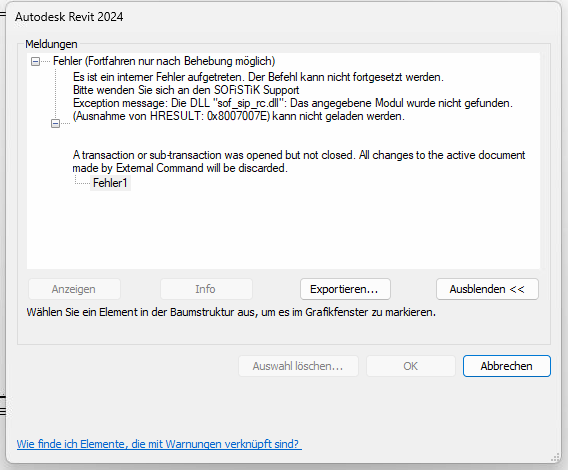
Temporary workaround:
Until a permanent fix is available, the issue can be resolved by simply installing:
 SOFiSTiK Analytical Model Generator (via SAM- SOFiSTiK Application Manager)
This ensures that the correct dependency version is available and properly loaded.
Next steps:
We are currently working on a fix and plan to provide an update within approximately 2 weeks.
If you are experiencing this issue, please share your exact Revit build/version with us to support further analysis.
Thank you for your understanding!
DE:
Hallo zusammen,
wir haben ein Problem in Revit 2024 identifiziert, das nach einem aktuellen Autodesk-Update Build 24.3.50.51 die Anwendungen SOFiSTiK Reinforcement und BIMTOOLS betrifft.
Unsere Anwendungen nutzen eine interne DLL namens sof_sip, die von einer weiteren, mit Revit ausgelieferten Komponente abhängt. Mit dem letzten Update wurde diese Abhängigkeit intern geändert, während die Datei selbst weiterhin im System vorhanden ist.
Dies führt dazu:
-
Die DLL wird weiterhin als verfügbar erkannt,
-
Unsere Installations- bzw. Lade-Logik geht von einer kompatiblen Umgebung aus,
-
Unsere geprüfte Version der Abhängigkeit wird nicht geladen oder überschrieben,
-
Dadurch kommt es zu unerwartetem Verhalten bzw. Fehlfunktionen.
Auswirkungen:
-
SOFiSTiK Reinforcement startet ggf. nicht oder funktioniert nicht korrekt
-
BIMTOOLS kann ebenfalls betroffen sein
-
Beispielmeldung:
Temporärer Workaround:
Bis zur Bereitstellung eines Fixes kann das Problem wie folgt umgangen werden:
Installation von SOFiSTiK Analytical Model Generator (aus SAM - SOFiSTiK Application Manager)
Dadurch wird sichergestellt, dass die passende Version der Abhängigkeit vorhanden ist und korrekt geladen wird.
Nächste Schritte:
Wir arbeiten aktuell an einer Lösung und planen, innerhalb von ca. 2 Wochen ein Update bereitzustellen.
Falls das Problem bei euch auftritt, gebt uns bitte eure genaue Revit-Version/Builtnummer durch.
Vielen Dank für euer Verständnis!
@everyone following this thread: the fix for this issue was released today, so the workaround of installing SOFiSTiK Analytical Model Generator ist no longer necessary, you can simply update SOFiSTiK Reinforcement from SAM (SOFiSTiK Application Manager) and uninstall the SOFiSTiK-AMG (if you don't need it)
– andrei