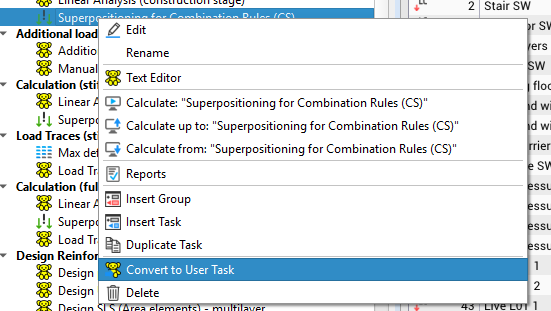
I am currently modelling the prestressed concrete bridge from the official SOFiSTiK training video. In the tutorial, the bridge is created using SOFiSTiK 2022, while I am working with SOFiSTiK 2026. During the analysis of the individual load cases, I encountered an error message that does not appear in the training video.
The warning I receive is:
“Prescribed support displacement at free node 1 only allowed for calculation of a single load case.”
I receive this warning 10 times, each time referring to a different node.
To investigate the issue, I removed the settlement load cases from the calculation. After doing so, the analysis ran without any problems. The settlement load cases (3 load cases in total) can only be calculated individually. However, when calculating them separately, I always receive the following warning:
“Prescribed support displacement at coupled node 1 may cause problems if the coupling defines an actual restraint in this direction. Inclined couplings can be processed but must be checked. Enable inclined coupled support displacements with STEU WARN 174.”
This warning causes the calculation to stop.
If I manually add the command:
STEU WARN 174
in the text viewer and start the calculation again, the analysis works correctly for each individual settlement load case. However, the command is not saved permanently in the program text. It only works immediately after I add it manually.
My question is:
How can I save STEU WARN 174 permanently in the project, or is there another recommended way to solve this issue so that the settlement load cases can also be calculated properly and repeatedly without manually editing the text each time?
Since the tutorial was created in SOFiSTiK 2022, I am wondering whether this behaviour could be related to changes in SOFiSTiK 2026 regarding coupled nodes, support settlements, or warning handling.