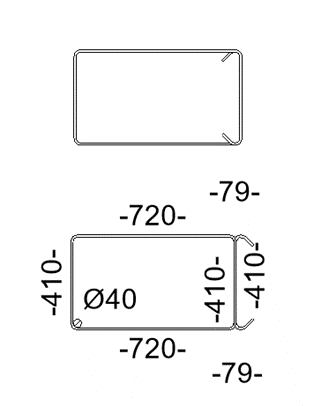
Hello, can you please tell me how to fix the problem with wrong hook orientation.
When I make torsion stirrup I get wrong hook orientation in shape detail and in schedule. (there is no problem with classic stirrup). I’m using revit 2022, and sofistik version 2022-4.
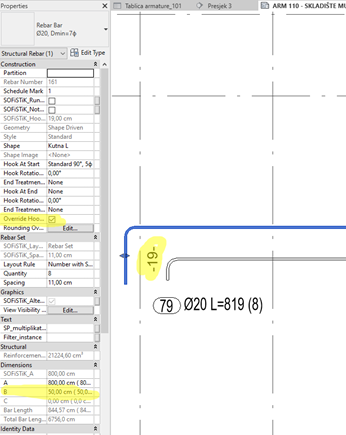
Also, can you please tell me why SOFiSTiK doesn’t change hook length when I use “Override hook length”?
The problem with hook orientation has been already resolved with the latest update 2022-4. It should be correct if you recreate the rebar. If not, please send us your inquiry with the RVT file to support@sofistik.com for further investigation.
Regarding the second question, I can see in the screenshot that the Shape detail shows the correct hook length as shown in the rebar properties => Parameter SOFiSTiK_Hook_Length.
Furthermore, 19 cm is the default auto calculated hook length for bar type Ø20, Dmin=7ϕ. You can override the hook length from Edit type =>hook lengths => deactivate the check box auto calculation and type the value.
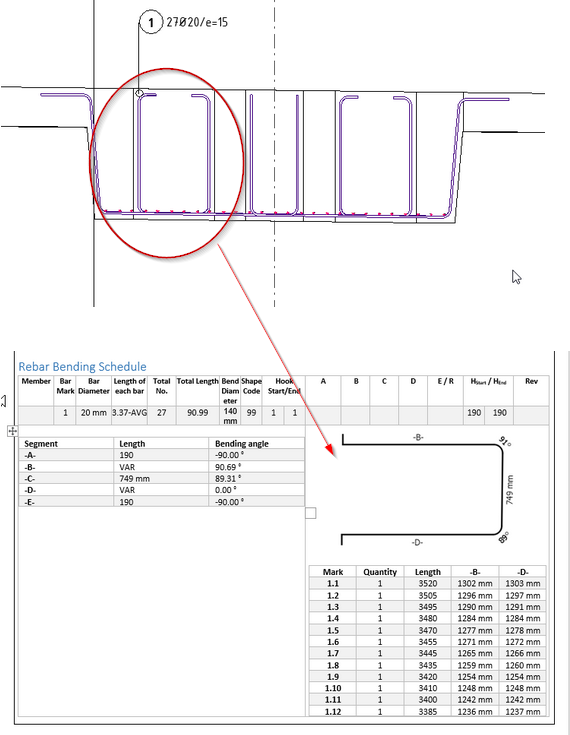
it seems this problem keeps occurring to us in the office. I have a Free Form Structural rebar set, that is almost perfectly U-shape. At the end of the U shape I have a hook that is oriented to the inside.
The orientation in the Bending schedule is the opposite. See the screenshot below - Rebar set 1.
I also have a rebar that the hook is oriented to the outside and the issue is the same. Actually I tried couple of different methods (Free Form Aligned option and Free Form Surface option) and I can not seem to find out what works and why.