Greetings Sofistik Community,
with Sofistik 2023, I want to read the node properties of a cdb file that has been generated by an external source. In order to do this, I have read the documentation on how to read the node properties ( Read the node properties - CDB Interfaces 2023 ) and the documentation of the programming interface in the cdbase.chm file in the Sofistik folder as well.
Based on these guides, I came up with the following code that works on the read_nodes.cdb file in the Sofistik examples folder, but not with any self-generated cdb file:
# +============================================================================+
# | Company:   SOFiSTiK AG                                                     |
# | Version:   SOFiSTIK 2023                                                   |
# +============================================================================+

# import all types from sofistik_daten.py, original file can be found by following
# --> examples/python/sofistik_daten.py
from sofistik_daten import *
import os                     # for the environment variable necessary
import platform               # checks the python platform
from ctypes import *          # read the functions from the cdb

from config import SOFISTIK_VERSION, DLL_DIR1, DLL_DIR2, PATH_TO_CDB, USE_TEST_CDB


fileName = r'\\PATH TO CDB FILE';


'''
read from db based on sofistik documentation
'''

# See for more information: https://docs.python.org/3/whatsnew/3.8.html#ctypes
os.add_dll_directory(DLL_DIR1)
os.add_dll_directory(DLL_DIR2)

# This example has been tested with Python 3.7 (64-bit)
print("The path variable=", os.environ["Path"])

# Check the python platform (32bit or 64bit)
print("Python architecture=", platform.architecture())
sofPlatform = str(platform.architecture())

# Get the DLL (32bit or 64bit DLL)
if sofPlatform.find("32Bit") < 0:
    # Set environment variable for the DLL files
    print("Hint: 64bit DLLs are used")
    path = os.environ["Path"]

    # # 64bit DLLs
    # dllPath = r"C:\sofistik_installation\trunk\SOFiSTiK trunk\interfaces\64bit"
    # dllPath += ";"

    # # other necessary DLLs
    # dllPath += r"C:\sofistik_installation\trunk\SOFiSTiK trunk"
    # os.environ["Path"] = dllPath + ";" + path

    # Get the DLL functions
    myDLL = cdll.LoadLibrary("sof_cdb_w-2023.dll")
    py_sof_cdb_get = cdll.LoadLibrary("sof_cdb_w-2023.dll").sof_cdb_get
    py_sof_cdb_get.restype = c_int
    py_sof_cdb_flush = cdll.LoadLibrary("sof_cdb_w-2023.dll").sof_cdb_flush
    py_sof_cdb_kenq = cdll.LoadLibrary("sof_cdb_w-2023.dll").sof_cdb_kenq_ex
else:
    # Set environment variable for the dll files
    print("Hint: 32bit DLLs are used")
    path = os.environ["Path"]

    # # 32bit DLLs
    # dllPath = r"C:\sofistik_installation\trunk\SOFiSTiK trunk\interfaces\32bit"
    # os.environ["Path"] = dllPath + ";" + path

    # Get the DLL functions
    myDLL = cdll.LoadLibrary("cdb_w31.dll")
    py_sof_cdb_get = cdll.LoadLibrary("cdb_w31.dll").sof_cdb_get
    py_sof_cdb_get.restype = c_int
    py_sof_cdb_flush = cdll.LoadLibrary("cdb_w31.dll").sof_cdb_flush
    py_sof_cdb_kenq = cdll.LoadLibrary("cdb_w31.dll").sof_cdb_kenq_ex

# Connect to CDB
Index = c_int()
'''
   Index = 0     initialise CDBASE and open scratch data base only
   Index = 99    test if NAME is a valid database and open the base
                 if possible. Return with the assigned index.
                 If the file does not exist, it will be created.
   Index = 96    open a scratch database, filename is the path to
                 use or NULL.
   Index = 95    open in read-only mode
   Index = 94    create a new data base (STATUS=NEW)
'''
cdbIndex = 99

# important: Unicode call!
'''
-16 unknown error
-17 path not found
-18 Name not valid
-27 file not found
-28 no permission to create file
-37 too many open files
-38 no permission to write file
-47 wrong CDBase-Version
-48 file is no CDBase-file
'''

if USE_TEST_CDB: fileName = fileName.encode('utf-8') # don't know why
cdbStat = c_int()  # get the CDB status

if not os.path.exists(fileName):
    print("Datei existiert nicht:", fileName)
else:
    Index.value = myDLL.sof_cdb_init(fileName, cdbIndex)
    if Index.value < 0:
        print("Fehler beim Öffnen, Code =", Index.value)
    else:
        print("CDB erfolgreich geöffnet, Index =", Index.value)
        cdbStat = myDLL.sof_cdb_status(Index.value)
        # status 3 is a combination of stat codes 1 + 2, 1 = CDBase is active, 2 = Index is connected to file
        print("Status =", cdbStat)

pos = c_int(0)
datalen = c_int(0)

ie = c_int(0)
datalen.value = sizeof(CNODE)
RecLen = c_int(sizeof(cnode))

"""
do while ie == 0, see cdbase.chm, Returnvalue.
    = 0 -> No error
    = 1 -> Item is longer than Data
    = 2 -> End of file reached
    = 3 -> Key does not exist
"""
py_sof_cdb_flush(Index)
while ie.value < 2:
    ie.value = py_sof_cdb_get(Index, 20, 0, byref(cnode), byref(RecLen), 1)
    print("{:10d}{:10d}{:10d}{:10d}{:10.2f}{:10.2f}{:10.2f}".format(
        cnode.m_nr,      # node-number
        cnode.m_inr,     # internal node-number
        cnode.m_kfix,    # degree of freedoms
        cnode.m_ncod,    # additional bit code
        cnode.m_xyz[0],  # x coordinates
        cnode.m_xyz[1],  # y coordinates
        cnode.m_xyz[2])  # z coordinates
    )

    # Always read the length of record before sof_cdb_get is called
    RecLen = c_int(sizeof(cnode))

# Close the CDB, 0 - will close all the files
myDLL.sof_cdb_close(0)

# Print again the status of the CDB, if status = 0 -> CDB Closed successfully
cdbStat = myDLL.sof_cdb_status(Index.value)
if cdbStat == 0:
    print("CDB closed successfully, status = 0")
with the .cdb test-file, the output looks like this:
(CDB successfully opened, index = 1, status = 3)
Hint: 64bit DLLs are used
CDB erfolgreich geöffnet, Index = 1
Status = 3
       101         1      1052         3     -1.50     -1.50      0.00
       102         2      1052         3     -1.50      1.50      0.00
       103         3      1052         3      1.50      1.50      0.00
       104         4      1052         3      1.50     -1.50      0.00
       500         5      1052         3      0.00      0.00      0.00
      1001         6      1052         2     -1.20     -1.50      0.00
      1002         7      1052         2     -0.90     -1.50      0.00
      1003         8      1052         2     -0.60     -1.50      0.00
      1004         9      1052         2     -0.30     -1.50      0.00
      1005        10      1052         2      0.00     -1.50      0.00
      1006        11      1052         2      0.30     -1.50      0.00
      1007        12      1052         2      0.60     -1.50      0.00
      1008        13      1052         2      0.90     -1.50      0.00
      1009        14      1052         2      1.20     -1.50      0.00
      1010        15      1052         2     -1.50     -1.20      0.00
      1011        16      1052         2     -1.50     -0.90      0.00
      1012        17      1052         2     -1.50     -0.60      0.00
      1013        18      1052         2     -1.50     -0.30      0.00
      1014        19      1052         2     -1.50      0.00      0.00
      1015        20      1052         2     -1.50      0.30      0.00
      1016        21      1052         2     -1.50      0.60      0.00
      1017        22      1052         2     -1.50      0.90      0.00
      1018        23      1052         2     -1.50      1.20      0.00
      1019        24      1052         2     -1.20      1.50      0.00
      1020        25      1052         2     -0.90      1.50      0.00
      1021        26      1052         2     -0.60      1.50      0.00
      1022        27      1052         2     -0.30      1.50      0.00
      1023        28      1052         2      0.00      1.50      0.00
      1024        29      1052         2      0.30      1.50      0.00
      1025        30      1052         2      0.60      1.50      0.00
      1026        31      1052         2      0.90      1.50      0.00
      1027        32      1052         2      1.20      1.50      0.00
      1028        33      1052         2      1.50     -1.20      0.00
      1029        34      1052         2      1.50     -0.90      0.00
      1030        35      1052         2      1.50     -0.60      0.00
      1031        36      1052         2      1.50     -0.30      0.00
      1032        37      1052         2      1.50      0.00      0.00
      1033        38      1052         2      1.50      0.30      0.00
      1034        39      1052         2      1.50      0.60      0.00
      1035        40      1052         2      1.50      0.90      0.00
      1036        41      1052         2      1.50      1.20      0.00
      1037        42      1052         2     -1.20     -1.20      0.00
      1038        43      1052         2     -1.20     -0.90      0.00
      1039        44      1052         2     -1.20     -0.60      0.00
      1040        45      1052         2     -1.20     -0.30      0.00
      1041        46      1052         2     -1.20      0.00      0.00
      1042        47      1052         2     -1.20      0.30      0.00
      1043        48      1052         2     -1.20      0.60      0.00
      1044        49      1052         2     -1.20      0.90      0.00
      1045        50      1052         2     -1.20      1.20      0.00
      1046        51      1052         2     -0.90     -1.20      0.00
      1047        52      1052         2     -0.90     -0.90      0.00
      1048        53      1052         2     -0.90     -0.60      0.00
      1049        54      1052         2     -0.90     -0.30      0.00
      1050        55      1052         2     -0.90      0.00      0.00
      1051        56      1052         2     -0.90      0.30      0.00
      1052        57      1052         2     -0.90      0.60      0.00
      1053        58      1052         2     -0.90      0.90      0.00
      1054        59      1052         2     -0.90      1.20      0.00
      1055        60      1052         2     -0.60     -1.20      0.00
      1056        61      1052         2     -0.60     -0.90      0.00
      1057        62      1052         2     -0.60     -0.60      0.00
      1058        63      1052         2     -0.60     -0.30      0.00
      1059        64      1052         2     -0.60      0.00      0.00
      1060        65      1052         2     -0.60      0.30      0.00
      1061        66      1052         2     -0.60      0.60      0.00
      1062        67      1052         2     -0.60      0.90      0.00
      1063        68      1052         2     -0.60      1.20      0.00
      1064        69      1052         2     -0.30     -1.20      0.00
      1065        70      1052         2     -0.30     -0.90      0.00
      1066        71      1052         2     -0.30     -0.60      0.00
      1067        72      1052         2     -0.30     -0.30      0.00
      1068        73      1052         2     -0.30      0.00      0.00
      1069        74      1052         2     -0.30      0.30      0.00
      1070        75      1052         2     -0.30      0.60      0.00
      1071        76      1052         2     -0.30      0.90      0.00
      1072        77      1052         2     -0.30      1.20      0.00
      1073        78      1052         2      0.00     -1.20      0.00
      1074        79      1052         2      0.00     -0.90      0.00
      1075        80      1052         2      0.00     -0.60      0.00
      1076        81      1052         2     -0.00     -0.30      0.00
      1077        82      1052         2      0.00      0.30      0.00
      1078        83      1052         2      0.00      0.60      0.00
      1079        84      1052         2     -0.00      0.90      0.00
      1080        85      1052         2      0.00      1.20      0.00
      1081        86      1052         2      0.30     -1.20      0.00
      1082        87      1052         2      0.30     -0.90      0.00
      1083        88      1052         2      0.30     -0.60      0.00
      1084        89      1052         2      0.30     -0.30      0.00
      1085        90      1052         2      0.30      0.00      0.00
      1086        91      1052         2      0.30      0.30      0.00
      1087        92      1052         2      0.30      0.60      0.00
      1088        93      1052         2      0.30      0.90      0.00
      1089        94      1052         2      0.30      1.20      0.00
      1090        95      1052         2      0.60     -1.20      0.00
      1091        96      1052         2      0.60     -0.90      0.00
      1092        97      1052         2      0.60     -0.60      0.00
      1093        98      1052         2      0.60     -0.30      0.00
      1094        99      1052         2      0.60      0.00      0.00
      1095       100      1052         2      0.60      0.30      0.00
      1096       101      1052         2      0.60      0.60      0.00
      1097       102      1052         2      0.60      0.90      0.00
      1098       103      1052         2      0.60      1.20      0.00
      1099       104      1052         2      0.90     -1.20      0.00
      1100       105      1052         2      0.90     -0.90      0.00
      1101       106      1052         2      0.90     -0.60      0.00
      1102       107      1052         2      0.90     -0.30      0.00
      1104       109      1052         2      0.90      0.30      0.00
      1105       110      1052         2      0.90      0.60      0.00
      1106       111      1052         2      0.90      0.90      0.00
      1107       112      1052         2      0.90      1.20      0.00
      1108       113      1052         2      1.20     -1.20      0.00
      1109       114      1052         2      1.20     -0.90      0.00
      1110       115      1052         2      1.20     -0.60      0.00
      1111       116      1052         2      1.20     -0.30      0.00
      1112       117      1052         2      1.20      0.00      0.00
      1113       118      1052         2      1.20      0.30      0.00
      1114       119      1052         2      1.20      0.60      0.00
      1115       120      1052         2      1.20      0.90      0.00
      1116       121      1052         2      1.20      1.20      0.00
      1116       121      1052         2      1.20      1.20      0.00
CDB closed successfully, status = 0
Whereas with the generated cdb-file, the output looks like this:
(CDB successfully opened, index = 1, status = 3)
Hint: 64bit DLLs are used
CDB erfolgreich geöffnet, Index = 1
Status = 3
         0         0         0         0      0.00      0.00      0.00
CDB closed successfully, status = 0
The function py_sof_cdb_get(…) returns the code number 3 which means the key 20/0 does not exist. But this contradicts the fact that the key 20/0 does exist in that file and is full of data:
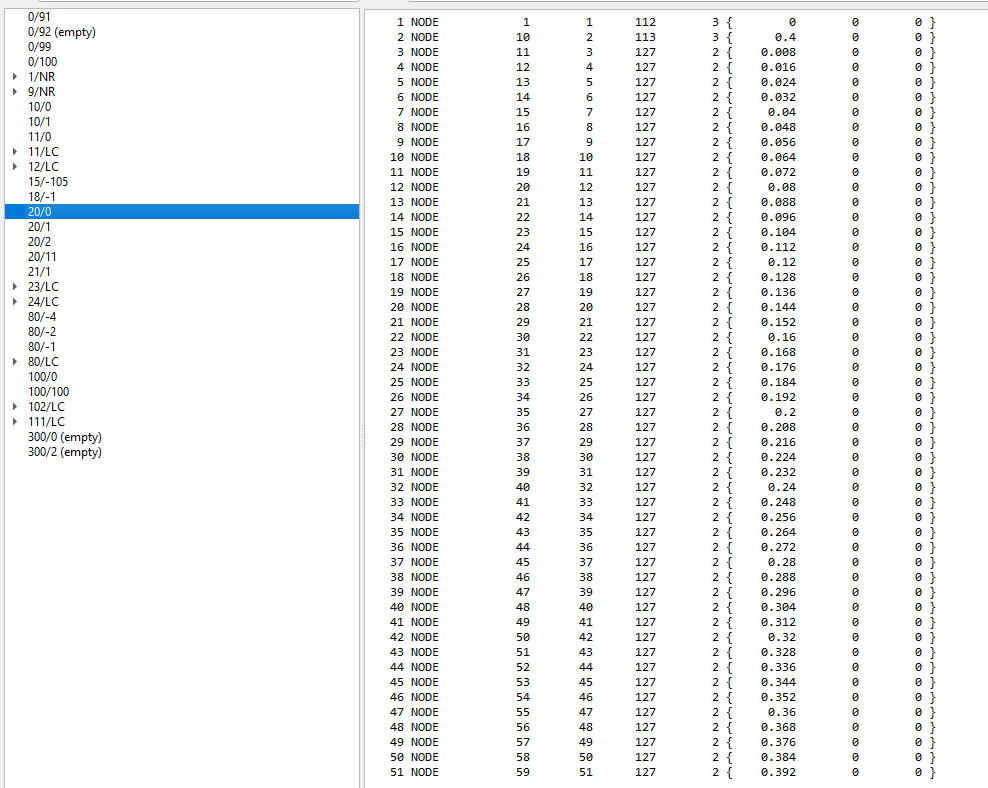
Unfortunately I am unable to upload anything since I am a new user and .cdb files cannot be uploaded in general.
Any help is appreciated, thank you in advance.